Are You Getting the Best Out of OurSys ERP? Introducing the Qualitative Usage Audit Report
OurSys ERP offers a wide range of advanced features to help manufacturing companies improve efficiency, maintain control and make better decisions. However, having a powerful ERP is only half the job. Using it correctly is equally important.
The benefits you get from OurSys depend on how well you use it. This includes maintaining good data quality, setting up the right security and access controls, following best practices, using time-saving features and ensuring that the software is configured optimally for your business.
Poor usage can significantly reduce the benefits of an ERP, even when the software itself is highly capable.
But how do you know whether your company is using OurSys correctly? Manually checking every module, setting and process can be a tedious and time-consuming exercise.
To address this challenge, we have introduced the Qualitative Usage Audit Report in OurSys.
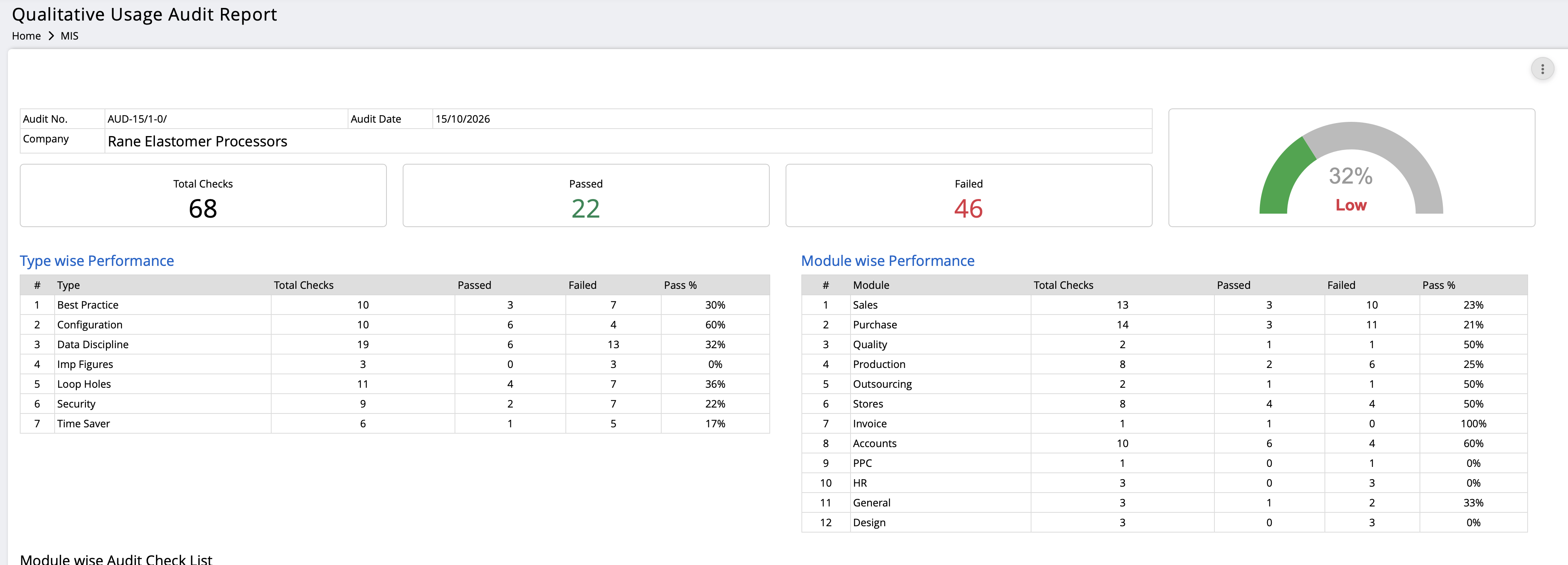
This report automatically checks a range of important parameters, gives you an overall score and highlights areas that need improvement. It helps you identify gaps in the way OurSys is being used and take corrective action.
1. How to access the report
Follow these steps to generate your latest report:
- Go to MIS in OurSys.
- Under the System Health section, click on Qualitative Usage Audit Report.
- Run the report to get the latest score.
If the report has never been run before, OurSys will ask whether you want to run it. Select Yes.
If you have already run it once, open the report, click the three-dot menu in the top-right corner and select Run the Qualitative Usage Audit Report.
2. How to configure the report
Every company works differently, and some audit parameters may not be relevant to your business.
You can customise the checklist to suit your requirements.
Open the report, click the three-dot menu and select Configure Qualitative Usage Audit Checklist.
Here, you can:
- Switch off parameters that are not relevant to your company.
- Set the period for checking applicable parameters.
- Define the limits for individual parameters, wherever required.
This allows you to focus on the areas that matter most to your business.
3. How to understand the report
The report gives you an overall score out of 100. A higher score indicates better qualitative usage of OurSys against the configured checklist.
It also provides a summary of passing and failing parameters, organised by module and by type.
Below the summary, you can view the individual parameters grouped by modules and categories. Each parameter indicates whether your company has passed or failed the relevant check.
The Remarks section provides details of the failures, helping you understand what needs to be corrected.
In short, the report tells you:
- What is working well.
- Where your usage needs improvement.
- Which modules or areas require attention.
- What corrective action is needed.
4. How to improve your score
The report is not just about identifying problems. Its real purpose is to help you improve the way you use OurSys.
Read the remarks against each failed parameter and take the necessary corrective action.
Different issues may require different approaches:
- Configuration-related issues: Some parameters depend on system settings. Contact our team for assistance in making the required changes.
- Data quality issues: These may require better discipline in data entry, corrections to existing records or improvements in business processes.
- User-related issues: Users may need training to understand and follow the recommended practices.
- Security and access issues: Review user permissions and security settings to ensure that access is appropriate.
As you address these issues, rerun the report to check your progress.
5. How does a good score benefit your company?
A good score is an indication that your OurSys environment is being used effectively and that important checks are being met.
Here is how this can benefit your business:
- Better data quality: Reliable data improves the quality of MIS reports and provides a stronger foundation for future AI-based tools and analysis.
- Improved security: Appropriate security settings and access permissions help reduce the risk of unauthorised access and data theft.
- More reliable business information: Correctly maintained parameters and settings help ensure that important figures and reports reflect your intended business rules.
- Better system configuration: An appropriate configuration helps OurSys support your business processes effectively.
- Higher user productivity: Following best practices and using time-saving features can reduce repetitive work and help users complete tasks faster.
Ultimately, the objective is to get more value from the OurSys ERP you already use.
6. What is the recommended procedure?
We recommend making the Qualitative Usage Audit Report part of your monthly ERP review.
At the end of every month:
- Run the latest audit report.
- Save it as a PDF or print a copy.
- Review the failures and assign responsibility for corrective action.
- Set deadlines for improvements.
- Review the next month's report to check progress.
Some improvements, such as correcting configuration settings, may be one-time activities. Others, particularly data discipline and adherence to best practices, require continuous attention.
The key is to treat the report as an ongoing improvement tool, not just a checklist.
We also intend to introduce automatic monthly distribution of this report from OurSys to key stakeholders in your company, making it easier for management to monitor usage quality and follow up on improvements.
7. Is this similar to DataOps?
Yes, in some ways.
DataOps focuses on improving the quality, reliability and management of data used across an organisation. The Qualitative Usage Audit Report supports this objective by identifying data-related issues that need attention.
However, its scope goes beyond data quality.
It also checks aspects such as system configuration, security settings, access management, best practices and the use of time-saving features.
Think of it as a broader health check of how your company uses OurSys ERP. It helps you improve not just your data, but also the way your ERP is configured, secured and used by your team.
8. What does the future hold?
The current report checks approximately 70 parameters covering different aspects of qualitative usage.
We plan to expand the checklist over time to identify more potential problem areas and help customers improve their ERP usage further.
As OurSys evolves, we want this report to become an increasingly valuable tool for maintaining system health, improving data reliability and ensuring that customers continue to get the maximum benefit from their ERP.
Your feedback matters!
At OurSys, we believe that the value of an ERP depends not only on its features but also on how effectively those features are used.
The Qualitative Usage Audit Report is another step towards helping our customers get more out of OurSys through better data, stronger security, smarter configuration and improved working practices.
We encourage you to run the report, review your score and make it part of your monthly ERP review process.
We would love to hear your feedback. How useful is this report to your organisation? Which additional parameters would you like us to include?
Your suggestions will help us make this utility even more useful for the entire OurSys user community.