Tip
You can check all related documents during supplier's invoice passing. All the documents that are uploaded during GRN are visible in Supplier Invoice once you tag the Invoice to the GRN.
Did you know?
Did you know that you can change the no. of records you are able to see in OurSys by changing the setting available in the gear icon. By default it is set to 50 records but it can be changed.
Best Practice
The rights to add Supplier master should be with only couple of users in order to control the supplier master and it's quality.
Understanding Reports
| Report Name |
Sales Order Stage wise Detailed Report |
| Where to find it |
MIS >> Sales >> Insights |
| Who should use this |
Sales & PPC |
| What frequency to check: |
Every day as required |
| Filters for the report |
Between OA dates, Customer, Sales Category, Pending etc. |
Screenshot of the Report
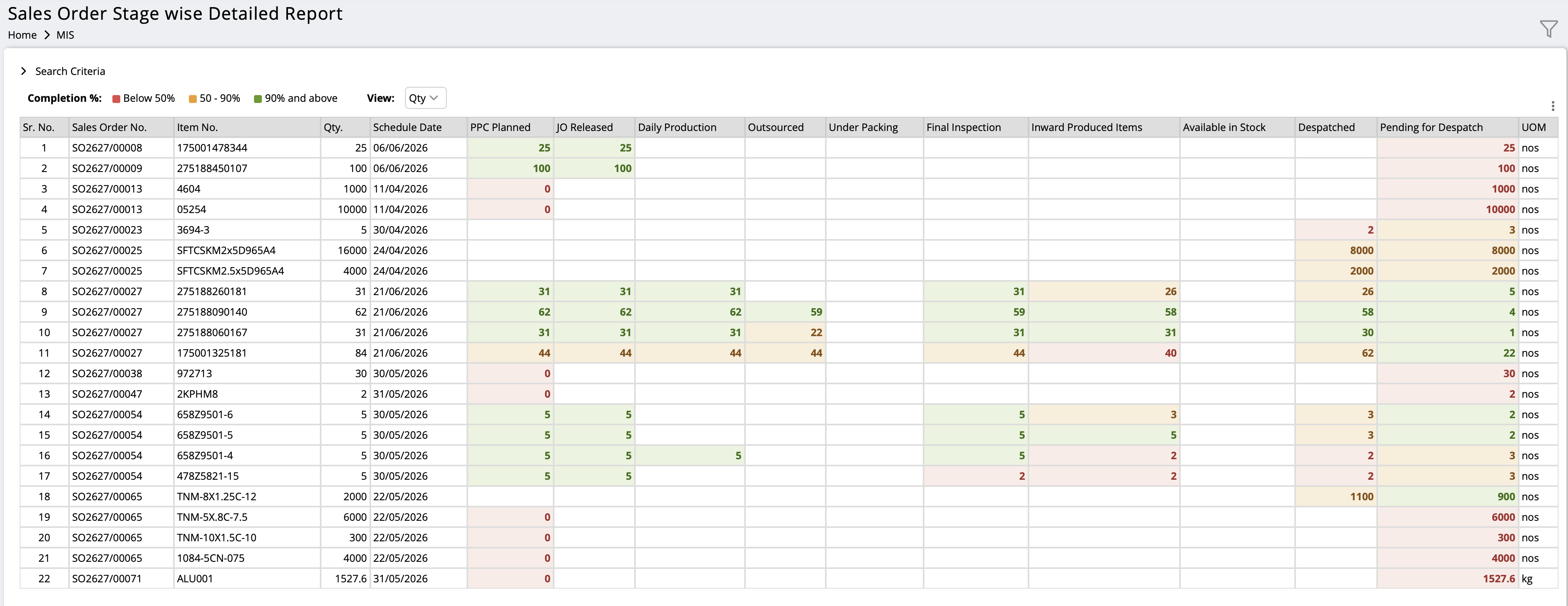
Report showing Sales Order Item wise Stage wise Status Report
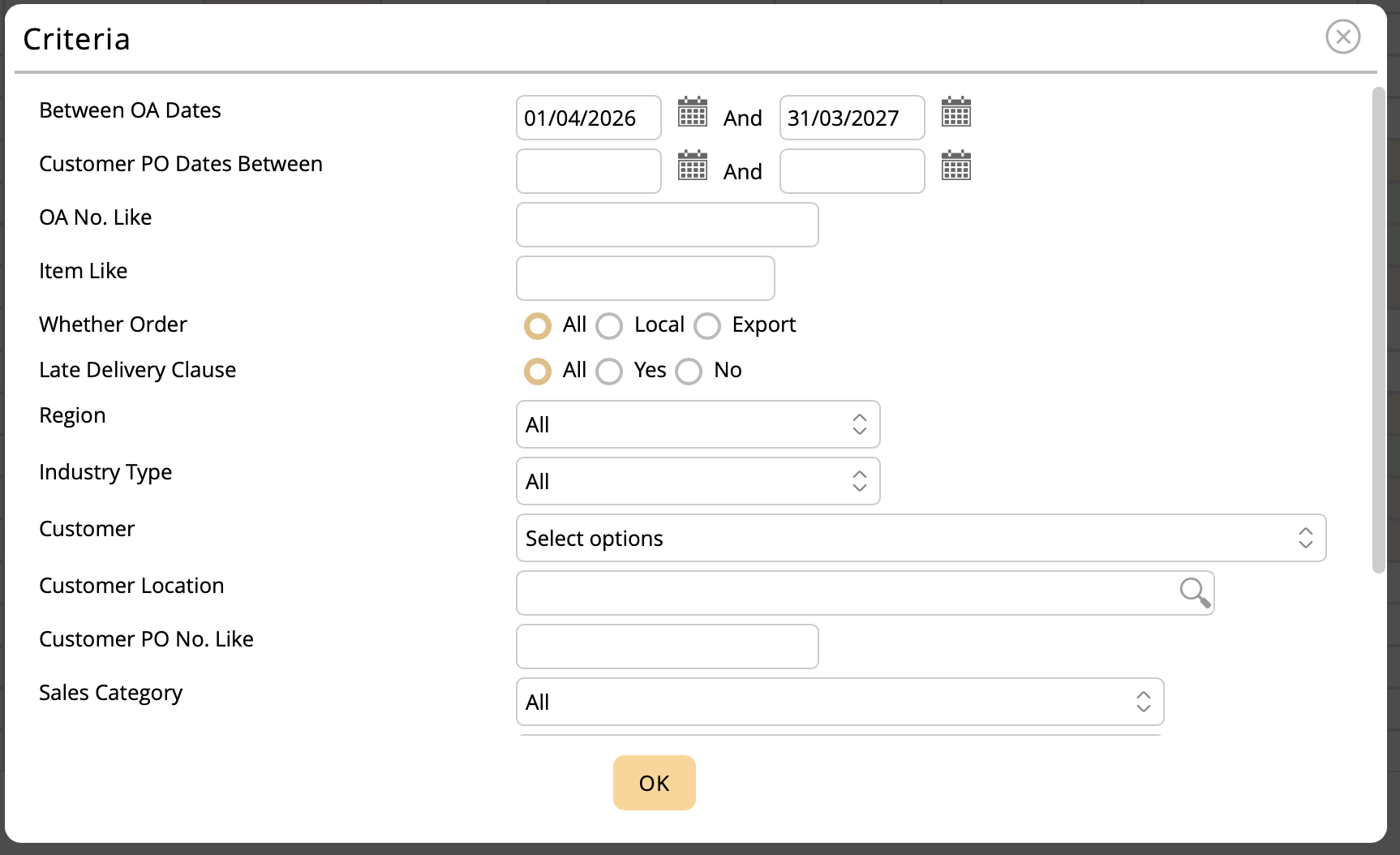
This report can be seen for a particular date range
× ![]()
Information in the report & how to use it:
- This report shows the exact status of items on order
- It shows the quantities at each stage such as MRP Planned, JO Released, Production, Outsourced, Packing, Final inspection, Inward after Production, In Stock, Despatched and what is balance to be despatched. All this in one row.
- The report also shows the Scheduled delivery date of every item.
- This report can be viewed quantity wise as well as percentage wise
- It also shows colour coding based on completion percentage.
Notification
-
Important functionality added!! Please run the "Qualitative Usage Audit Report" made available to all our customers. We have kept this feature free in order to encourage its usage and improve the effectiveness of OurSys ERP. This feature is available in MIS>>System Health>>Usage Report. Click on the 3 dot icon in this report to run this see the report results.
-
AWS Disclaimer: We have been helping our customers with AWS but these days AWS has been changing its pricing polices frequently. We do not have any association with AWS and also do not have the expertise to understand these policies. We wish to make it clear to our customers that we cannot stand responsible for charges levied by AWS. We will continue to help you but do not wish to be responsible for it.
What's new
- A "Details" option has been added while selecting an item in Purchase Requisition. Users can now instantly view important item information such as Current Stock, Free Stock, Allocated Stock, MOQ (Minimum Order Quantity), EOQ (Economic Order Quantity), and other relevant details, enabling better purchase decisions and faster data entry.
- A Multiple Schedule provision has been added in Purchase Requisition. While selecting an item, users can now specify if multiple delivery schedules are required. The system automatically creates multiple schedule entries for the same item with the respective quantities and required-by dates, reducing manual effort and improving purchase planning accuracy.
- A Revert option has been added in RFQ. Authorised users can now revert a finalised RFQ back to an editable stage, make the necessary corrections or updates, and finalise it again, ensuring greater flexibility and improved data accuracy
Article
OurSys Item Selector: Making Item Selection Simple, Fast and Technically Accurate
In engineering and manufacturing companies, selecting the right item can often be more difficult than it sounds.
Read the full article
Case Study
Accounts Vouchers Approval
Customer Introduction:
This company adds 200 plus vouchers a day into OurSys and needed a mechanism to control vouchers
Challenge
OurSys had the freeze date function which is used by accounts heads to lock voucher data month by month to ensure the vouchers are not changed. But there was no way to mark individual vouchers as checked. There was risk that some vouchers could be changed by users after checking before it was frozen. Also sometimes only a particular type of voucher needs approval. There was no way to set only a particular type of voucher for approval
The Solution:
We have now introduced Account Voucher Approval, allowing users to configure approval workflows for selected voucher types from the available 13 voucher categories. This enables organisations to apply approvals only where required while avoiding additional approval steps for routine vouchers. For system-generated vouchers, such as Sales Voucher from Sales Invoice and Purchase Voucher from Supplier Invoice, the system will automatically follow the configured approval workflow before posting the accounting entries.
The Result / Benefits:
Thus security of data was ensured without increasing the load of approval by too much.
Feedback
The intention of this newsletter is to make our customers aware of the features of OurSys and help them to utilise OurSys to the fullest. We would like to have your feedback on how we can further improve this effort.
Please click
here to give us your feedback.